Vital Signs - Blood Pressure

Vital Signs - Blood Pressure

Personal Health Apps
Advertisement
4.6
Medical
100,000+ Downloads

Click to download now, finish the installation quickly, and directly unlock the "all-round experience"

Advertisement

Screenshots
Screenshot
Screenshot
Screenshot
Screenshot
Screenshot
Screenshot
Screenshot
Screenshot

About This App

πŸ† Expert Verdict & Overview

Vital Signs - Blood Pressure positions itself as a comprehensive digital health companion within the Medical category. It eschews the common gimmick of attempting measurements via a smartphone’s hardware, instead focusing on its core competency: being a robust, centralized logging and analysis platform for a wide array of health metrics. This clarity of purpose is a significant strength, setting clear expectations for users who need a reliable repository for data from their various external medical devices. The app's value proposition lies in transforming disparate data points into actionable insights and shareable reports, directly addressing the core need for longitudinal health tracking in chronic condition management.

πŸ” Key Features Breakdown

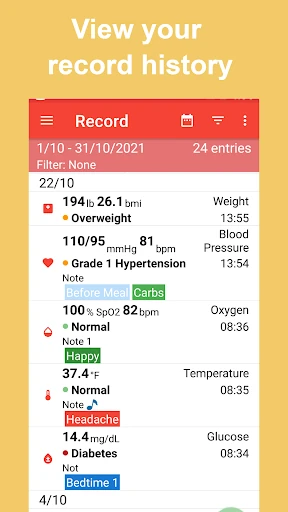
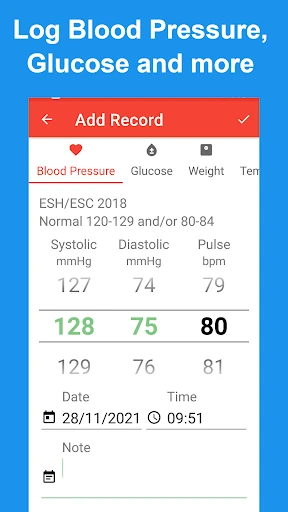
  • Multi-Metric Logging: Solves the user problem of fragmented health data by allowing centralized tracking of blood pressure, glucose, SpO2, and more in one place, eliminating the need for multiple, single-purpose apps.
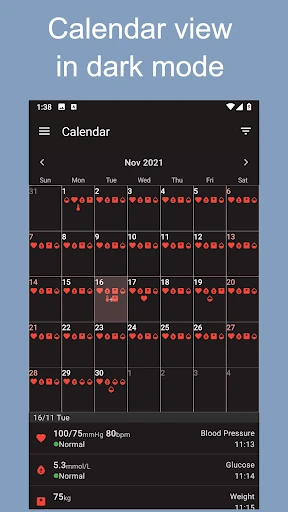
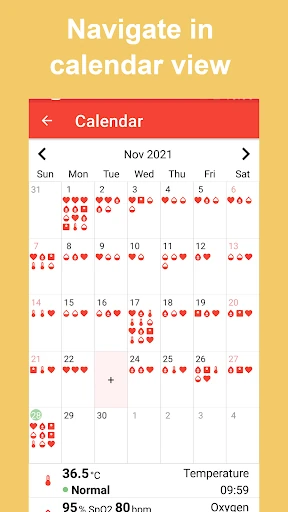
  • Calendar View & Data Organization: Addresses the challenge of contextualizing health data over time by providing a visual calendar interface for logging and reviewing entries, making it easy to spot patterns related to specific dates or periods.
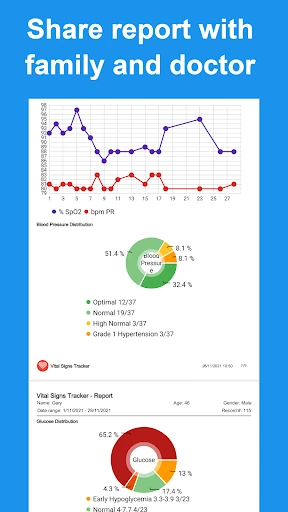
  • Advanced Reporting & Sharing: Directly tackles the critical need for effective patient-provider communication by generating detailed reports in CSV, Excel, and PDF formats, facilitating informed medical discussions with family and doctors.
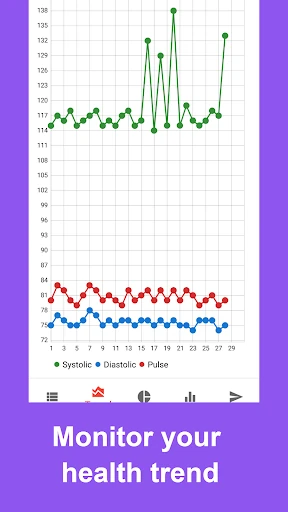
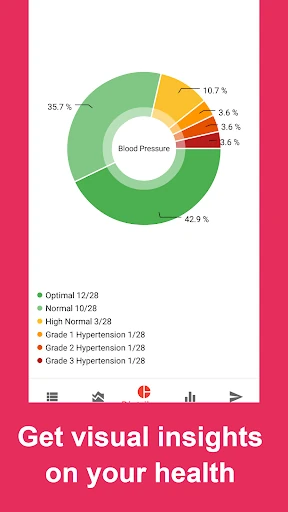
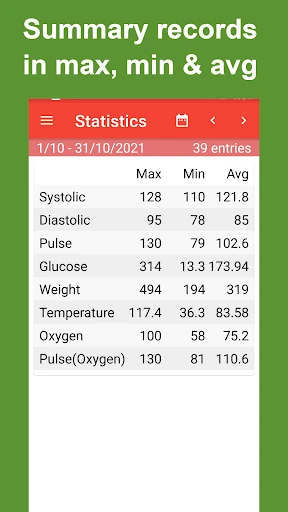
  • Automated Categorization & Trend Analysis: Solves the problem of data overload by automatically classifying entries and calculating key statistics (max, min, avg), enabling users to move from raw data to understanding their health trends easily.
  • Flexible Tagging System: Empowers users to personalize their data organization, allowing them to create custom tags (e.g., "Post-Medication," "Morning Reading") for more granular analysis and insight.

🎨 User Experience & Design

The interface appears to prioritize functionality and clarity, which is appropriate for the Medical category where data accuracy and ease of entry are paramount over flashy aesthetics. The prominent calendar view suggests a strong focus on temporal data review, a core UX principle for health tracking. For a medical app, the user experience success hinges on minimizing the friction of data input and maximizing the clarity of data output. The mention of automated categorization and summary statistics indicates a design that seeks to reduce cognitive load for the user, presenting complex information in an immediately digestible format. The overall design philosophy seems aligned with the serious nature of its purpose: efficient logging, unambiguous presentation, and straightforward sharing.

βš–οΈ Pros & Cons Analysis

  • βœ… The Good: Exceptional clarity in its purpose, honestly stating it does not measure but logs, managing user expectations perfectly.
  • βœ… The Good: Highly comprehensive metric support covers the needs of users managing hypertension, diabetes, and general wellness.
  • βœ… The Good: Powerful, export-friendly reporting features that bridge the gap between home monitoring and professional healthcare.
  • βœ… The Good: Intelligent data organization through auto-categorization, tagging, and trend visualization adds significant analytical value.
  • ❌ The Bad: The user experience may feel utilitarian or dated compared to more visually polished wellness apps, potentially affecting user engagement.
  • ❌ The Bad: Lacks direct integration with Bluetooth health devices (e.g., smart blood pressure monitors, glucometers), requiring manual data entry which can be prone to error and is less convenient.
  • ❌ The Bad: The inclusion of a direct plea for a positive rating in the description, while understandable, can appear unprofessional in a medical context.

πŸ› οΈ Room for Improvement

The most impactful next update would focus on connectivity. Implementing secure Bluetooth or Wi-Fi integration with popular FDA-cleared health devices would transform the app from a passive logger to an active health hub, dramatically improving accuracy and user convenience. Secondly, a visual design refresh adhering to modern Material Design or iOS Human Interface guidelines would enhance perceived trust and usability. Finally, adding features like customizable thresholds (highlighting out-of-range values) and medication reminders with direct log linkage would deepen its utility for chronic disease management.

🏁 Final Conclusion & Recommendation

Vital Signs - Blood Pressure is highly recommended for disciplined individuals managing chronic conditions like hypertension or diabetes, and for caregivers who need to track and report on a loved one's health data. It is especially suitable for users who prioritize data control, detailed reporting, and comprehensive tracking over automated syncing or a highly gamified experience. Its honest approach and powerful reporting tools make it a valuable, no-nonsense companion for anyone serious about taking a data-driven approach to their long-term health management alongside their medical professionals.