PhotoScan by Google Photos

PhotoScan by Google Photos

Google LLC
Advertisement
4.1
Photography
50,000,000+ Downloads

Click to download now, finish the installation quickly, and directly unlock the "all-round experience"

Advertisement

Screenshots
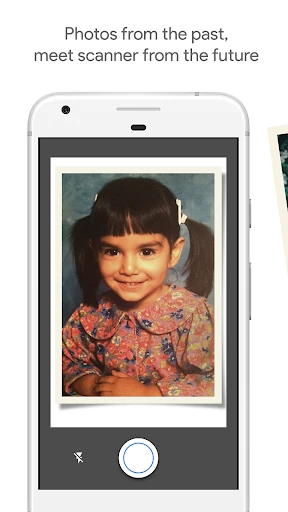
Screenshot
Screenshot
Screenshot
Screenshot

About This App

๐Ÿ† Expert Verdict & Overview

PhotoScan by Google Photos is a specialist scanner application that elegantly solves a specific yet highly relevant problem within the Photography app landscape: the effective digitization of physical prints. Built by Google, it goes beyond a simple camera function by employing sophisticated computer vision to correct common scanning issues. It operates as a perfect companion to Google Photos, creating a seamless pipeline for preserving, organizing, and refining one's photo legacy.

๐Ÿ” Key Features Breakdown

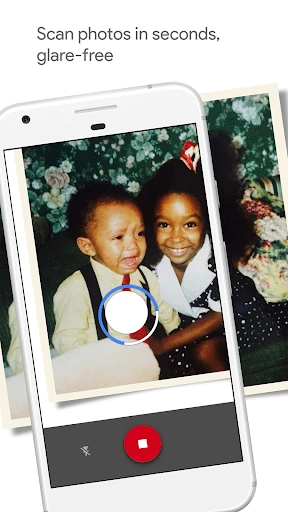
  • Multi-Point Capture Flow: Instead of a single shot, it guides users to position their camera over four markers. This solves the persistent problem of glare from glossy prints and ambient light by capturing multiple images and stitching the best data from each, resulting in a pristine digital copy.
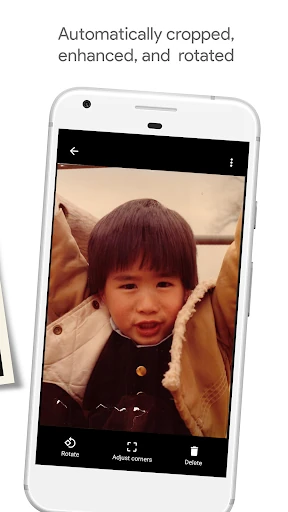
  • Automatic Edge Detection & Cropping: By automatically detecting the edges of the photo, it eliminates the tedious manual cropping process, saving significant time and ensuring consistent, perfectly aligned results for every scan.
  • Automatic Perspective Correction: Corrects for skewed or angled photo placement during the scan. This solves the common issue of wobbly hands or uneven surfaces, guaranteeing the final digital scan is straight and rectangular as if scanned by a flatbed scanner.
  • Smart Auto-Rotation: Analyzes the content of the scanned image and ensures it is always displayed right-side-up, removing the need for manual rotation later. This solves user frustration and streamlines the archiving workflow.
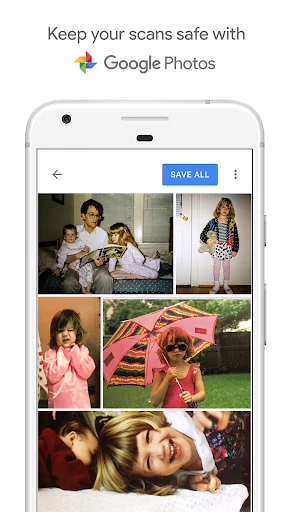
  • Google Photos Ecosystem Integration: Direct backup to Google Photos solves the critical problems of safety, searchability, and organization. Photos become immune to physical damage, are instantly searchable, and can be enhanced with Google's suite of editing tools, transforming a static scan into a living part of a user's digital library.

๐ŸŽจ User Experience & Design

The UI/UX is minimalist and highly intuitive, adhering to Googleโ€™s material design principles with clear visual guidance. The step-by-step capture flow feels like a game, making a technical process accessible to users of all skill levels. The interface removes all extraneous controls, focusing the user solely on the task of scanning, which is ideal for a Photography utility app. Post-scan actions are clear, linking users directly to Google Photos for further actions, ensuring a frictionless end-to-end experience.

โš–๏ธ Pros & Cons Analysis

  • โœ… The Good: Unmatched ability to remove glare from prints, delivering significantly higher quality scans than a standard phone camera shot.
  • โœ… The Good: The onboarding and scanning process is brilliantly simple and self-explanatory, requiring no manual or prior experience.
  • โœ… The Good: Deep, seamless integration with Google Photos providing automatic cloud backup, powerful organization, and advanced editing tools.
  • โŒ The Bad: Functionality is exclusively tied to the Google Photos ecosystem, which can be a limitation for users who prefer other cloud services or local-only storage.
  • โŒ The Bad: Lacks advanced scanner app features like OCR for text documents or multi-page batch scanning, positioning it solely as a photo digitization tool.

๐Ÿ› ๏ธ Room for Improvement

Future updates could expand the app's utility by introducing Optical Character Recognition (OCR) to make text within scanned photos (like dates or notes on the back) searchable. A batch mode for scanning multiple photos in a sequence would dramatically improve efficiency for large album archiving projects. Furthermore, offering a choice of default save locations beyond Google Photos, such as local device storage or other cloud providers, would increase its appeal to a broader audience.

๐Ÿ Final Conclusion & Recommendation

PhotoScan by Google Photos is a masterclass in focused, user-centric app design and is highly recommended for two primary audiences. First, for any user invested in the Google Photos ecosystem looking to digitize old prints with minimal effort and maximum quality. Second, for casual users who need a simple, free, and effective tool for occasional photo scanning. It may not satisfy power users needing document scanning features, but for its intended purpose, it remains the best-in-class solution.