Microsoft Family Safety

Microsoft Family Safety

Microsoft Corporation
Advertisement
3.9
Parenting
5,000,000+ Downloads

Click to download now, finish the installation quickly, and directly unlock the "all-round experience"

Advertisement

Screenshots
Screenshot
Screenshot
Screenshot
Screenshot

About This App

🏆 Expert Verdict & Overview

Microsoft Family Safety positions itself as a comprehensive digital well-being hub within the Parenting tech landscape. It distinguishes itself by offering a centralized, cross-platform solution that extends beyond simple screen time monitoring. The app's strength lies in its integration with the broader Microsoft ecosystem (Xbox, Windows, Edge), aiming to provide a unified framework for managing family digital life, balancing oversight with the promotion of healthy, educational independence.

🔍 Key Features Breakdown

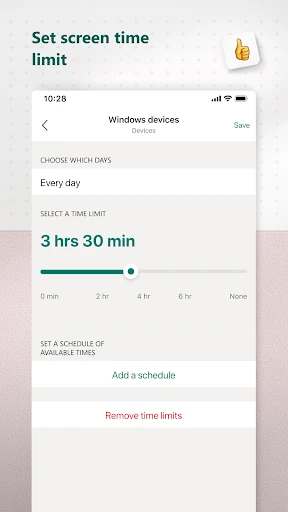
  • Cross-Platform Screen Time Management: Solves the modern parent's challenge of fragmented device usage by allowing them to set consistent app and game limits across Android, Xbox, and Windows PCs from a single dashboard.
  • Granular Content Filtering: Addresses safety concerns by enabling parents to block inappropriate apps and enforce kid-friendly web browsing specifically within Microsoft Edge, creating a curated digital environment.
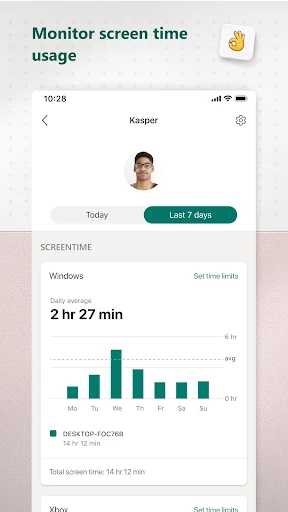
  • Automated Activity Reporting: Tackles the lack of visibility into children's digital habits by providing detailed logs and weekly email summaries, facilitating informed, data-driven family conversations about online activity.
  • Request & Approval System: Mitigates potential conflict by allowing children to request more screen time directly through the app, fostering negotiation skills and reducing the need for constant parental micromanagement.

🎨 User Experience & Design

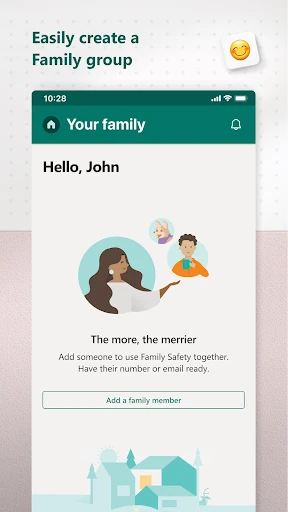
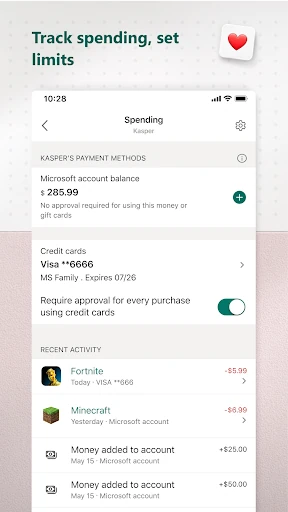
The interface prioritizes clarity and centralization, which is crucial for a parenting app managing complex rules and data. Key metrics and settings are accessible, reducing the cognitive load for parents navigating multiple children and devices. The UX design effectively leverages the Microsoft account system for a unified family profile, streamlining setup. The weekly email digest is a thoughtful touch that respects a parent's time by pushing digestible insights rather than requiring constant app checking. The design philosophy clearly favors function and clarity over aesthetic flair, which aligns with the app's utilitarian purpose in the Parenting category.

⚖️ Pros & Cons Analysis

  • ✅ The Good: Offers a genuinely unified management experience across Microsoft's dominant platforms (Windows, Xbox), a rare and valuable feature.
  • ✅ The Good: The weekly email report transforms raw data into actionable insight, promoting positive family dialogue rather than just surveillance.
  • ✅ The Good: Explicit privacy commitments regarding location data and data brokers help build trust, a critical factor for security-conscious parents.
  • ❌ The Bad: Its core value is significantly reduced for families primarily using non-Microsoft ecosystems (e.g., iOS, non-Edge browsers, PlayStation).
  • ❌ The Bad: Web filtering is limited to Microsoft Edge, creating a potential loophole if children use other browsers on managed devices.
  • ❌ The Bad: The need for specific Android permissions (Accessibility, Device Admin) may be technically daunting for some users and could raise initial privacy concerns despite the app's stated intent.

🛠️ Room for Improvement

The most significant enhancement would be expanding platform-agnostic features. Developing companion apps or deeper integrations for iOS/macOS and popular non-Microsoft browsers would dramatically increase its utility for mixed-device households. Secondly, introducing more nuanced controls, such as scheduling screen time limits based on time of day or task completion (e.g., "unlock game time after 30 minutes of reading"), would add a layer of positive reinforcement. Finally, an "Incognito Mode" for parents to temporarily suspend rules during vacations or special occasions would add welcome flexibility.

🏁 Final Conclusion & Recommendation

This app is a top-tier recommendation for families deeply embedded in the Microsoft ecosystem. It is an essential tool for parents with children using Windows PCs and Xbox consoles, offering unparalleled centralized control and insightful reporting. For families using a diverse mix of platforms, its value is more limited, and it may best serve as a complementary tool rather than a complete solution. Ultimately, Microsoft Family Safety excels at its core mission: providing structured digital guardrails that empower parents to grant age-appropriate independence with greater confidence and less friction.