Reimagine: Scan & Enhance Pics

Reimagine: Scan & Enhance Pics

MyHeritage.com
Advertisement
4.2
Photography
100,000+ Downloads

Click to download now, finish the installation quickly, and directly unlock the "all-round experience"

Advertisement

Screenshots

Screenshot
Screenshot
Screenshot
Screenshot
Screenshot
Screenshot
Screenshot
Screenshot
Screenshot
Screenshot
Screenshot
Screenshot

About This App

🏆 Expert Verdict & Overview

In the Photography app category, which is often dominated by filters and social sharing, Reimagine: Scan & Enhance Pics carves out a distinct and valuable niche. It is not a tool for creating trendy social media photos, but a powerful digital preservation suite designed for history and memories. This app targets a critical user pain point—the degradation of physical photo archives—and provides a comprehensive, AI-powered solution to digitize, restore, and even re-animate them, positioning itself as an essential tool for personal historians and families.

🔍 Key Features Breakdown

  • AI-Powered Photo Scanning: Solves the initial, often intimidating, hurdle of digitization. By focusing on ease of use (a few taps) and built-in metadata tagging (names, dates, places), it transforms a physical shoebox of photos into an organized digital library.
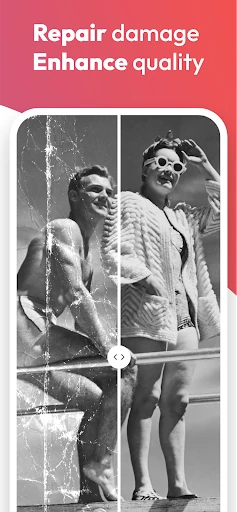
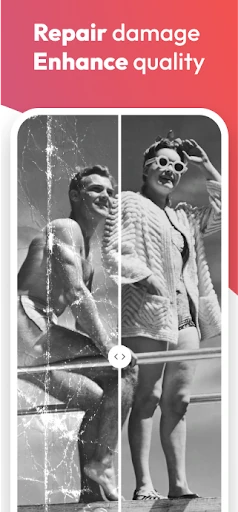
  • Photo Enhancer & Photo Repair: Addresses the two most common issues with legacy photos. The AI not only removes technical flaws like blur or scratches but intuitively enhances overall quality, effectively reversing physical decay and bridging the quality gap with modern digital images.
  • Photo Colorization: Tackles the emotional disconnect of black-and-white imagery. This feature uses AI to add historically plausible color, making past scenes feel more immediate, personal, and relatable, particularly for younger generations.
  • Deep Nostalgia™ Animation: Uniquely solves the desire for a deeper connection. By animating subtle facial gestures, it creates a profoundly emotional experience, transforming static portraits into vivid, memorable moments that can feel conversational.
  • Unified Storage & Sharing: Provides a centralized, secure hub for the newly enhanced archive. This solves fragmentation by keeping all restored memories in one place and facilitates easy sharing with family members, ensuring the collection is preserved and enjoyed collectively.

🎨 User Experience & Design

The UI/UX is clearly designed for accessibility over complexity, which is the correct approach for its target demographic. The workflow is linear and guided: Scan > Enhance > Organize > Share. Each core function (Enhance, Colorize, Animate) is presented as a prominent, single-tap action, minimizing cognitive load. The design prioritizes showcasing the "before and after" transformation, providing immediate, satisfying feedback. For a Photography app focused on restoration, this simplicity empowers users to achieve professional-grade results without needing technical expertise in photo editing software.

⚖️ Pros & Cons Analysis

  • ✅ The Good: Exceptionally powerful and specialized AI tools for restoration and animation that are not commonly bundled together.
  • ✅ The Good: Streamlined, intuitive workflow makes advanced photo manipulation accessible to non-technical users.
  • ✅ The Good: Strong focus on photo organization and metadata helps build a meaningful digital family archive.
  • ❌ The Bad: As a specialized tool, it lacks the broader creative editing suite (advanced cropping, filters, effects) found in general-purpose photography apps.
  • ❌ The Bad: The most emotionally impactful feature (Deep Nostalgia™) may raise privacy or ethical considerations for some users.
  • ❌ The Bad: The value proposition is heavily dependent on having a collection of older, physical photos to restore.

🛠️ Room for Improvement

For a future update, the development team should consider adding batch processing for the enhancement tools, as manually improving a large archive can be tedious. Expanding the organizational framework with a timeline or family tree visualizer would leverage the collected metadata more powerfully. Introducing basic video restoration or colorization could be a natural extension of the core mission. Finally, exploring optional cloud storage integration (beyond on-device/library structure) would provide a stronger backup solution for these irreplaceable restored memories.

🏁 Final Conclusion & Recommendation

Reimagine: Scan & Enhance Pics is an expertly crafted, purpose-driven app. It is highly recommended for genealogy enthusiasts, family historians, or anyone with a box of cherished but deteriorating old photos. It is not the right tool for daily photography or artistic manipulation. The final verdict is that it successfully fulfills its niche promise: it is the most effective and user-friendly digital toolkit available for preserving, enhancing, and re-experiencing photographic family history, making it an invaluable utility for its specific audience.